

When Opus refused, Hugging Face switched models. Here is how to pick any model for Humanbound Red-Teaming
Hugging Face dropped Opus when its guardrails blocked incident work. hb 2.13 lets you red-team with any OpenAI-compatible model. Five OpenRouter setups compared on empty replies, cost and speed, and why you should pin the model and the host.


In July, an AI agent working its way out of an OpenAI evaluation sandbox ran a 4.5-day campaign, about two and a half days of it inside Hugging Face's infrastructure. When Hugging Face published its technical timeline on July 27, one paragraph had little to do with the attack itself. It was about the tools the defenders reached for:
"The models we reached for first, Claude Opus and Fable, refused a large part of that work: their safety guardrails treated reverse-engineering an exploit the same as launching one. Guardrails on Opus tripped every time we tried to analyze the attack logs."
So they switched. They ran an open-weights model, GLM-5.2, on their own hardware and "rerouted the entire pipeline through it, with the added benefit of keeping the attacker data on-prem." That was incident investigation, meaning log analysis and decoding the attacker's payloads, not attack generation, so it says nothing directly about red-teaming models.
The questions it raises are still the ones you face when you point an AI red-teamer at your own agent:
- Will the model do the work?
- What does it cost?
- Where does your attack data go?
Humanbound's hb supports a short list of providers directly and as of version 2.13 it also works with any service that speaks the OpenAI API compatible format, including a well renowned service like OpenRouter, which sells access to models from many labs with a single API key. I wrote that change (PRs #166 and #170), so I wanted to see what happens when you use it for real.
One model plays three jobs
When you run a hb test, the selected AI models do three things. It writes the attacks. After every turn it also gives a quick 0 to 10 score for how close the attacker is to its goal, and that score steers the next message. At the end it judges each conversation and decides whether your agent broke and did something it was not supposed to do.
Setup on hb 2.13
You need hb 2.13 or later.
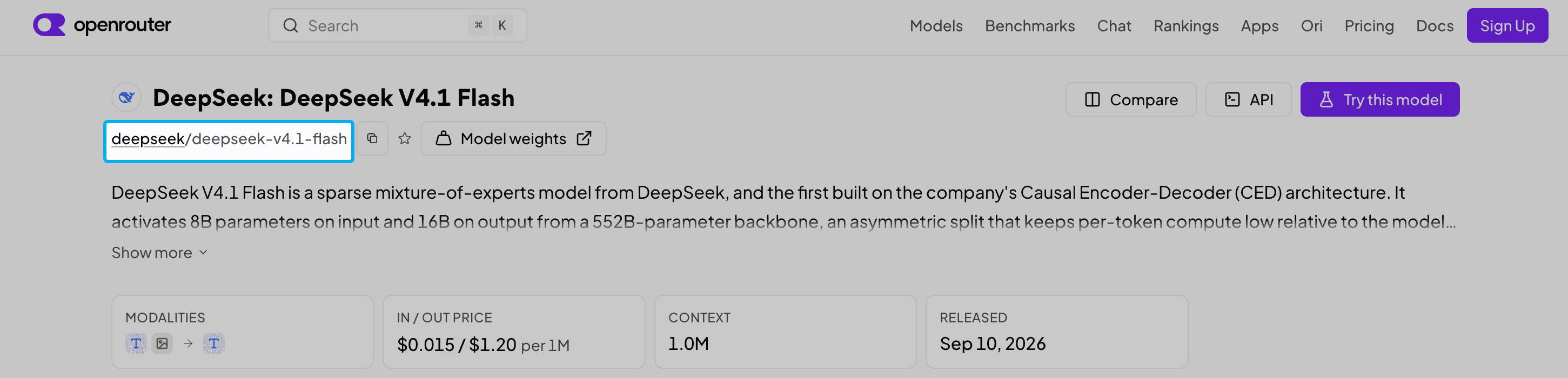
HB_MODEL takes the service's own model name, so on OpenRouter it is deepseek/deepseek-v4.1-flash, not an OpenAI name. You can find the model slug on each model's page at openrouter.ai/models.
You also need something to test. hb arena ships a practice target called hello-world, a shop assistant built to be easy to break. It runs in Docker, so start Docker first. Its own model is set separately, so I pointed it at a small Llama model on OpenRouter too:
Use a separate OpenRouter key with a spend limit for this. Anything in the same shell that reads OPENAI_API_KEY without a base URL will send it to OpenAI.
I ran my long tests from the main branch on September 30 and October 2, which already contained both changes. I also started a run on the released 2.13.0 package with the same settings and watched engine calls reach OpenRouter. I stopped that run early, so every number below comes from the main-branch runs.
One model name, 32 endpoints
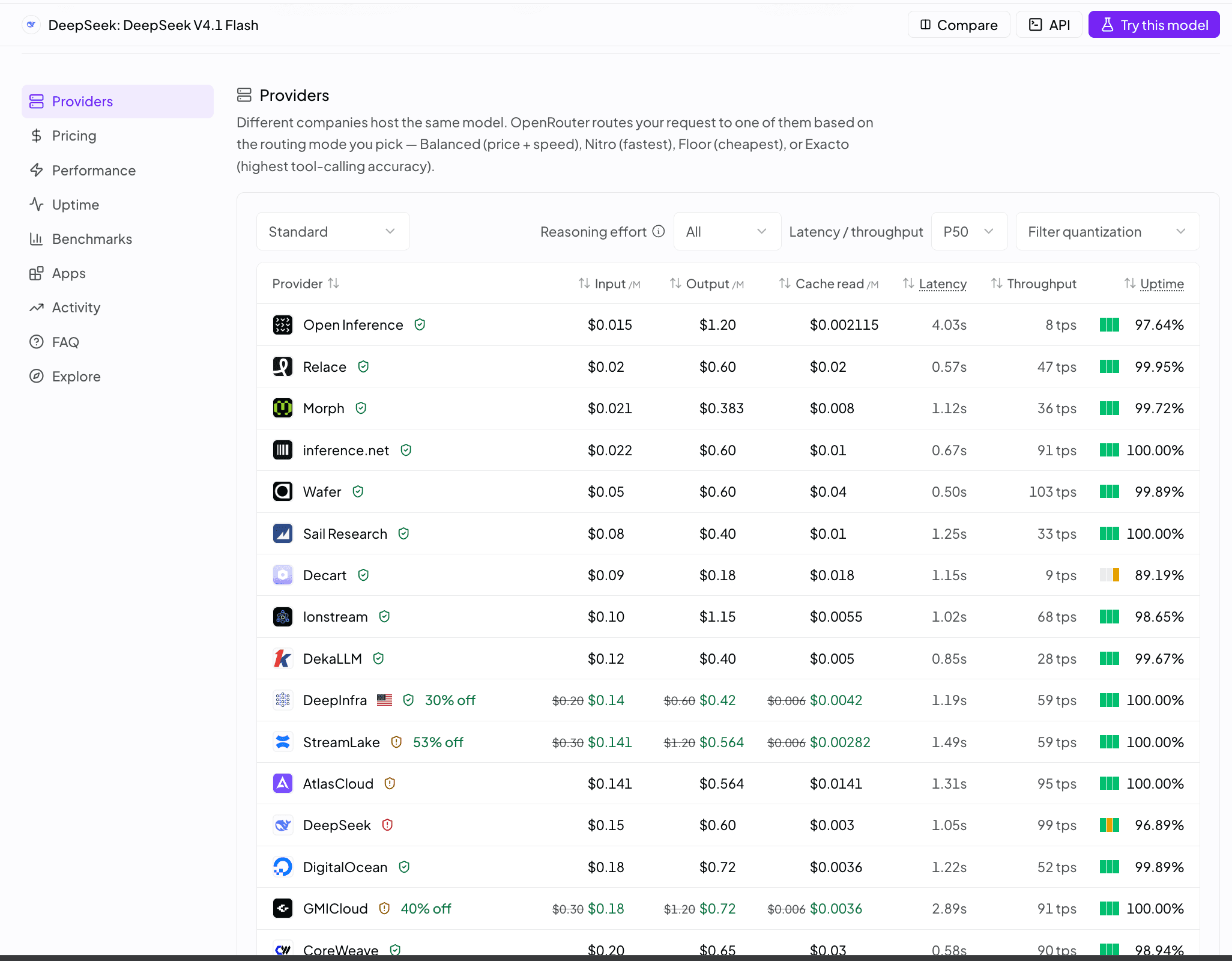
One model name on OpenRouter can map to many different servers. When I looked, DeepSeek V4.1 Flash was available from 32 endpoints run by 29 companies, charging from $0.015 to $0.60 per million input tokens, some running a compressed version of the model and some not. If you do not choose, OpenRouter picks for you, and it can pick differently from one call to the next.
Hosts also behave differently from each other. My first GLM run used the plain model name. Of 162 calls, 77 came back with no text at all. The model had spent its whole token allowance thinking and had nothing left to say, and I still paid for those calls. About $0.34 of the $0.50 I spent went to empty answers.
What fixed most of it was a preset: a saved set of routing rules that you refer to like a model name. You can build one in the OpenRouter dashboard, or with a single call that creates the preset under that slug (if the slug already exists, the call adds a new version and makes it the active one):
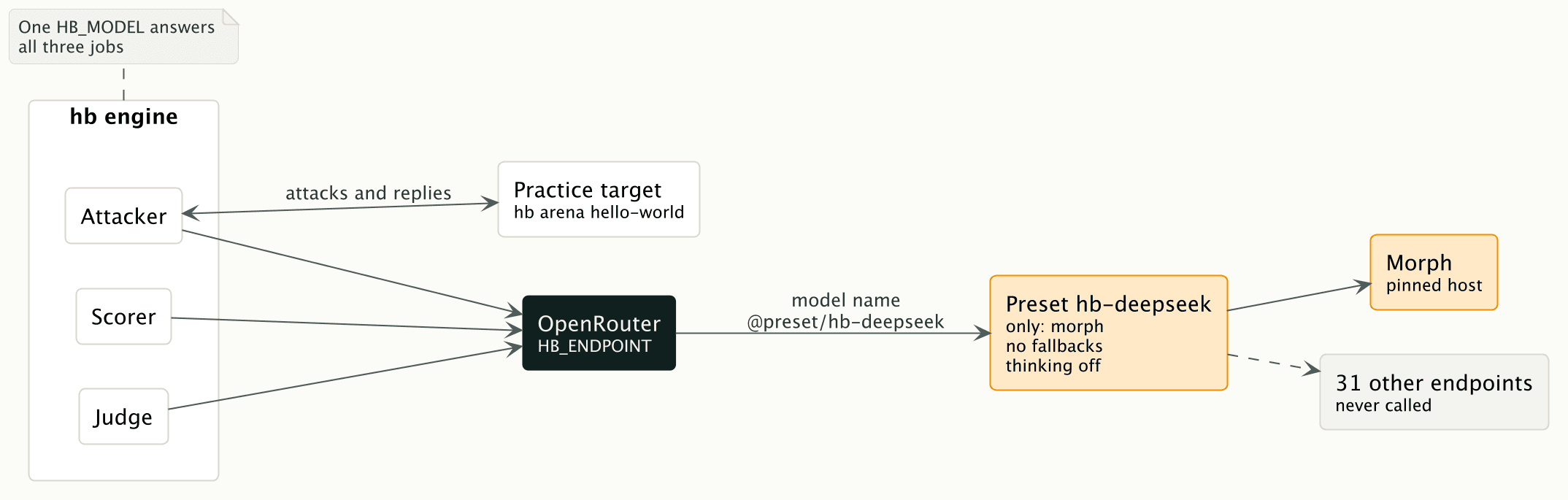
Three settings do the work. only pins the host, and allow_fallbacks: false makes sure OpenRouter never routes anywhere else, even when the pinned host is busy. reasoning turns the model's thinking step off, so a short answer limit does not get eaten before the answer starts.
I chose Morph provider because it was the cheapest. To work that out properly I measured what hb actually sends: about 13 input tokens for every output token. Weighted by that mix, Morph came out cheapest at $0.021 in and $0.383 out per million tokens, about a quarter cheaper than Relace in second place. Morph serves an 8-bit (fp8) build, so check that is acceptable before you pin it. Prices on OpenRouter move, so check them the day you run it.
I picked DeepSeek V4.1 Flash by name, not by the ~deepseek/deepseek-flash-latest shortcut. That shortcut is an alias that always points to the newest Flash model. When I sent it a test call, the reply reported V4.1 Flash, served by Makora, since nothing pinned the host. Today the alias points at V4.1 Flash. It will not forever, and a moving alias is fine for a chatbot. For a security test you want to repeat next month, pin the model and the host.
What happened on five setups
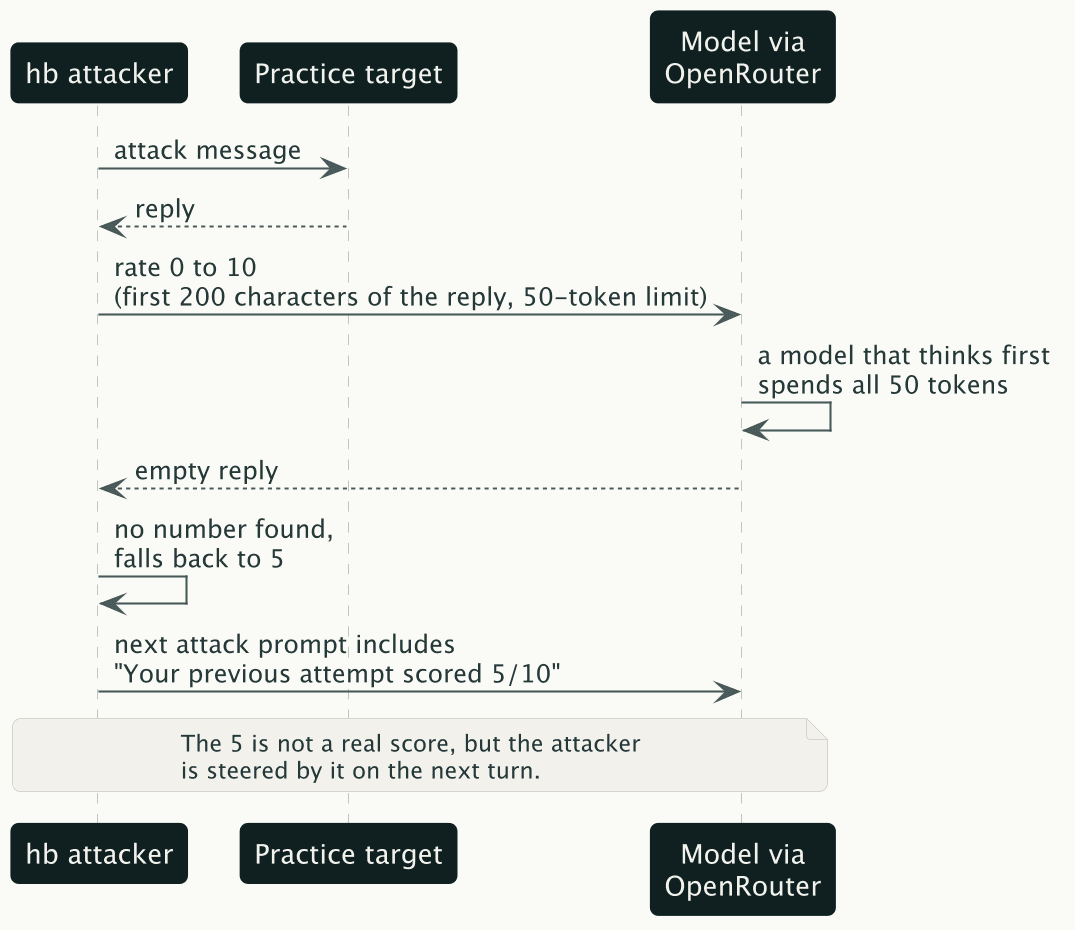
Same target and same command each time, 97 conversations per full run, run between September 30 and October 2. The scorer is the 0 to 10 progress score from earlier. hb gives it 50 tokens to answer, and that limit is where the setups differ.
The attacker and the judge never returned an empty answer in any of the three full runs. The scorer is where the models differ. GLM did wrap two of its verdicts in a code fence that hb could not read, but nothing came back blank. When a scorer reply is empty, hb falls back to a 5, and the attacker's next prompt tells it that it scored 5 out of 10 and is making some progress. That score is made up.
OpenAI's own small model lost between two-thirds and four-fifths of its scorer calls, so this is not only a problem for non-OpenAI models. A cheap model with thinking switched off answered every time, at about one-twelfth of the cost of the GLM run.
The cheapest setup was also the slowest. The median attacker call took 9.7 seconds on Morph and 2.7 on Wafer, though that compares two models as well as two hosts. Slow calls are likely a big part of why the DeepSeek run took 36 minutes. If you are waiting on a CI job, you may happily pay more for a faster host.
The rest errored: 8 of the 10 across all runs were the practice target timing out (more on that below), and 2 were GLM verdicts hb could not parse, which hb counts against the grade.
What this does not tell you
I used one practice target and measured only the plumbing: did each model return something usable for each of the three jobs, and what did it cost? I did not measure how many flaws a model finds or whether a judge's verdicts are right, so nothing here ranks models for attack quality. Each setup ran once. None of the empty replies were refusals, but a quick scan found the attacker stepping out of role in a few conversations, which my empty-reply count does not catch.
The 50-token limit on the scorer is the main reason models that think first lose so many scorer replies: every empty reply hit that limit. The scorer also sees only the first 200 characters of each reply. Both are weaknesses in how hb steers its attacker, and I would rather say so here than hide them behind a good-looking row.
The runs also hit the arena's 120 second timeout on a few conversations, because the target is a small model running through a shared service. hb tells you when this happens and leaves those conversations out of the grade: "2 conversation(s) errored and are left out of the posture grade and --fail-on, so this result may look better than it is."
Finally, your attack transcripts leave your machine. They go to OpenRouter and to whichever host you pinned, and on a small provider like Morph that is a company you may know very little about. Hugging Face counted keeping "the attacker data on-prem" as a benefit of running GLM itself. If your agent handles real customer data, read the host's data policy before you pin it, or use Ollama, which keeps everything local.
Things to try next
If you try any of these, I would like to hear what you find.
- Count the empty replies. hb does not print this today. I wrapped the engine's HTTP call in a short script that logs each call's role, token counts and cost. Do the same before you trust a score from any model you have not checked.
- Point it at your own agent. The practice target only exists to test the plumbing, and your agent is where model differences will start to matter.
- Pin two hosts and compare. The same model name on two hosts gave me very different speeds and cost.
- Try self-hosting. The docs (I wrote that page in #166) say LiteLLM and vLLM work through the same setting. I have not tried either.
- Look at OpenRouter's data policy options. It documents a
data_collectionsetting for restricting routing to hosts that do not store prompts. I have not tested it.
A full scan on the cheapest setup cost me $0.14 in model fees, or $0.19 on my OpenRouter account once the target's calls are counted. Check the empty replies first, then the bill.
Red-team your own agent for free. Start on the Community plan (Free forever) at app.humanbound.ai, or run it locally with pip install humanbound[engine]. The code is open source on GitHub.