

Secure AI Agents - How to put the Humanbound Firewall in front of your agent
Two lines of Python attach the Humanbound Firewall to a LangChain agent. This setup guide walks through the policy file, the Tier 3 judge model, and rolling enforcement out in log mode before you switch to block, using a customer support bot as the running example.


Two lines of Python attach the Humanbound Firewall to a LangChain agent. The rest of the setup is the policy file those two lines read, the model the firewall uses as its judge, and the order in which you switch enforcement on. This tutorial covers all of it, from pip install to a protected agent, using a small customer support bot with two tools as the running example: lookup_order reads a row from the store's order database, and issue_refund moves money.
humanbound-firewall is the open-source (Apache-2.0) runtime half of Humanbound. The CLI tests an agent before you ship it. The firewall sits inside the running agent and screens what goes into the model. The commands below were checked against humanbound 2.13.0, humanbound-firewall 0.3.1 and LangChain 1.4.5. This is a setup guide, so it makes no claims about catch rates.
What the firewall screens, and why authorship matters
An agent reads more than its user's messages. It reads tool results, fetched pages, documents and its own records coming back from a database. Indirect prompt injection comes in through those paths, and a model cannot reliably tell an instruction from data on its own. The firewall treats every one of those paths as a boundary and judges each payload by who wrote it. The docs call these trust classes:
requestis a principal's turn, usually the user. It may direct the agent, within policy.ingestis outside content: tool output, pages, documents, a sub-agent's reply. It may inform the agent but should never direct it.recallis the agent's own records coming back, such as a database row your system wrote. It should be plain data, so any instruction inside it means the record was tampered with.
The class follows authorship, not location. In the docs' example, a ticket stored in your own Jira was written by whoever filed it, so it is ingest, even though it lives in your system.
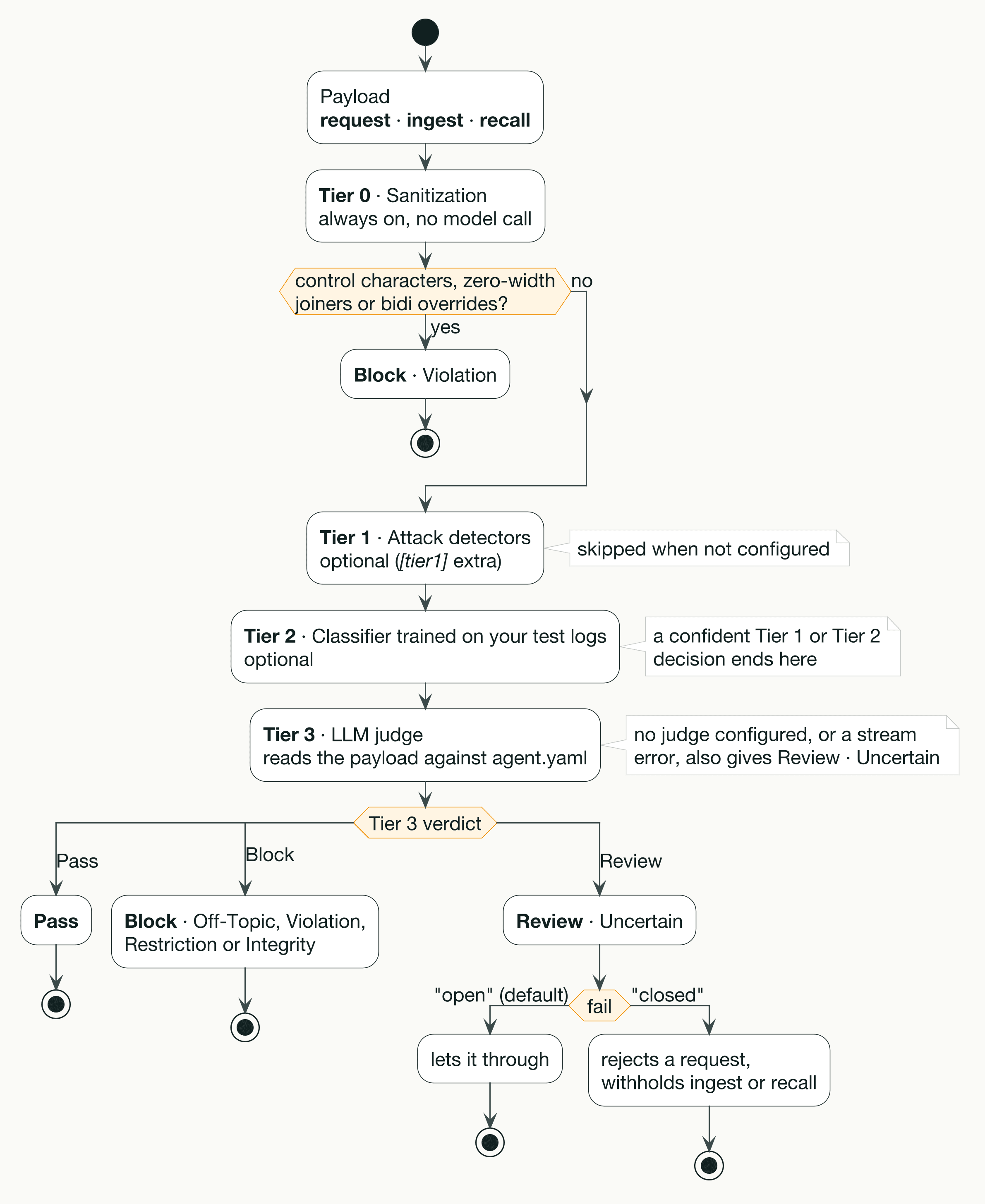
Each payload then passes through up to four tiers. Tier 0 is sanitization: it blocks input carrying invisible control characters, zero-width joiners or bidirectional overrides, costs nothing and is always on. Tier 1 is an optional ensemble of pre-trained attack detectors. Tier 2 is an optional classifier trained on your own test logs. Tier 3 is an LLM judge that reads the payload against your policy, and it only runs when the lower tiers cannot reach a confident decision. A minimal setup is Tier 0 plus Tier 3, which is what this guide builds. In that setup every payload Tier 0 lets through goes to the judge, so every clean user turn and every text tool result costs one LLM call.
Install the library and write the policy file
The firewall needs the SDK for whichever provider will run the Tier 3 judge, so install it with the matching extra. The extras are openai, anthropic and gemini:
Tier 1 needs torch and transformers, which is why it has its own extra (humanbound-firewall[tier1]). Skip it for now, and add it later only if you want more payloads resolved locally.
LangChain is your application's dependency, not the firewall's. There is no [langchain] extra, and the adapter expects LangChain 1.x with create_agent.
Next comes the policy file, agent.yaml. It describes your agent: what it is for, what it may do, what it must never do. It never describes an attack. If you have already run hb test against the agent, the Humanbound CLI (pip install humanbound) writes the file from the scope the test used, so run it from the directory where you ran the test. You can also generate it straight from a scope file, without any test run, as long as you are not logged in to the platform:
When you are logged in to the platform, the CLI ignores --scope and exports the active project's policy instead. For the support bot, the generated file looks like this:
The comment at the top tells you what is missing. The export covers scope, intents and, when your scope declares them, capabilities. Anything specific to your deployment you add by hand. Here is the same file after editing:
Four additions. name shows up in the firewall's reports, and without it the header just reads agent. capabilities lists the kinds of boundary the agent has, and [tools] is also the default. The tools block is where authorship gets encoded. With no tools block, every tool result is treated as ingest, which is the strict default. Listing lookup_order under recall tells the firewall that this tool returns records your own system wrote, so its output is checked for integrity (does the record instruct at all?) instead of policy. expects describes what a tool should return and is shown to the judge; without it, the judge sees the tool's own docstring. issue_refund stays ingest, because nothing says otherwise.
The tools block can only relax the default. A tool can be reclassified to recall or ingest, never to request. Finally, settings.timeout caps how many seconds the Tier 3 judge gets.
Give the judge a model
Tier 3 calls an LLM, so it needs a provider and a key. The documented way is environment variables:
Azure OpenAI also takes HUMANBOUND_FIREWALL_ENDPOINT and, optionally, HUMANBOUND_FIREWALL_API_VERSION. The older HB_FIREWALL_* names still work, with a deprecation warning that Python hides by default. If you would rather not use the environment, Firewall.from_config() also accepts a provider= argument built from Provider, ProviderIntegration and ProviderName, which the Tier 3 section of the docs shows.
Set the model explicitly. In 0.3.1 the defaults are claude-sonnet-4-6-20250514 and gemini-pro, and neither appears in its vendor's current model list. A model that no longer exists fails quietly (see below).
If the provider variables are missing, Firewall.from_config() does not raise an error. The firewall loads without a judge. Every payload that Tier 0 (or Tier 1 and Tier 2, if you added them) cannot settle then comes back as Review, category Uncertain, with the explanation No LLM judge configured. Under the default fail="open", that verdict passes. In the minimal Tier 0 plus Tier 3 setup, a missing key leaves a firewall that blocks control characters and passes everything else, with no error at startup. The same silent pass happens when the provider name is not one of openai, azureopenai, claude or gemini. Note that the extra is anthropic but the provider value is claude, and setting anthropic loads with no judge and no warning. A wrong key, an expired key or a retired model fails the same way at call time: the verdict becomes Uncertain with a stream error as the explanation, and fail="open" lets it through. Before you trust the setup, send one harmless request through the agent and read the audit log. A working judge logs tier 3 with an empty explanation: the firewall acts on the first letter of the judge's reply, and the explanation streams in afterwards (d.wait_explanation() waits for it, at the cost of that wait, so use it only in log mode). A broken setup logs explanation as No LLM judge configured., Evaluation timed out. or a Stream error: message.
Add the middleware and read the boundary inventory
Here are the two lines, as the docs give them:
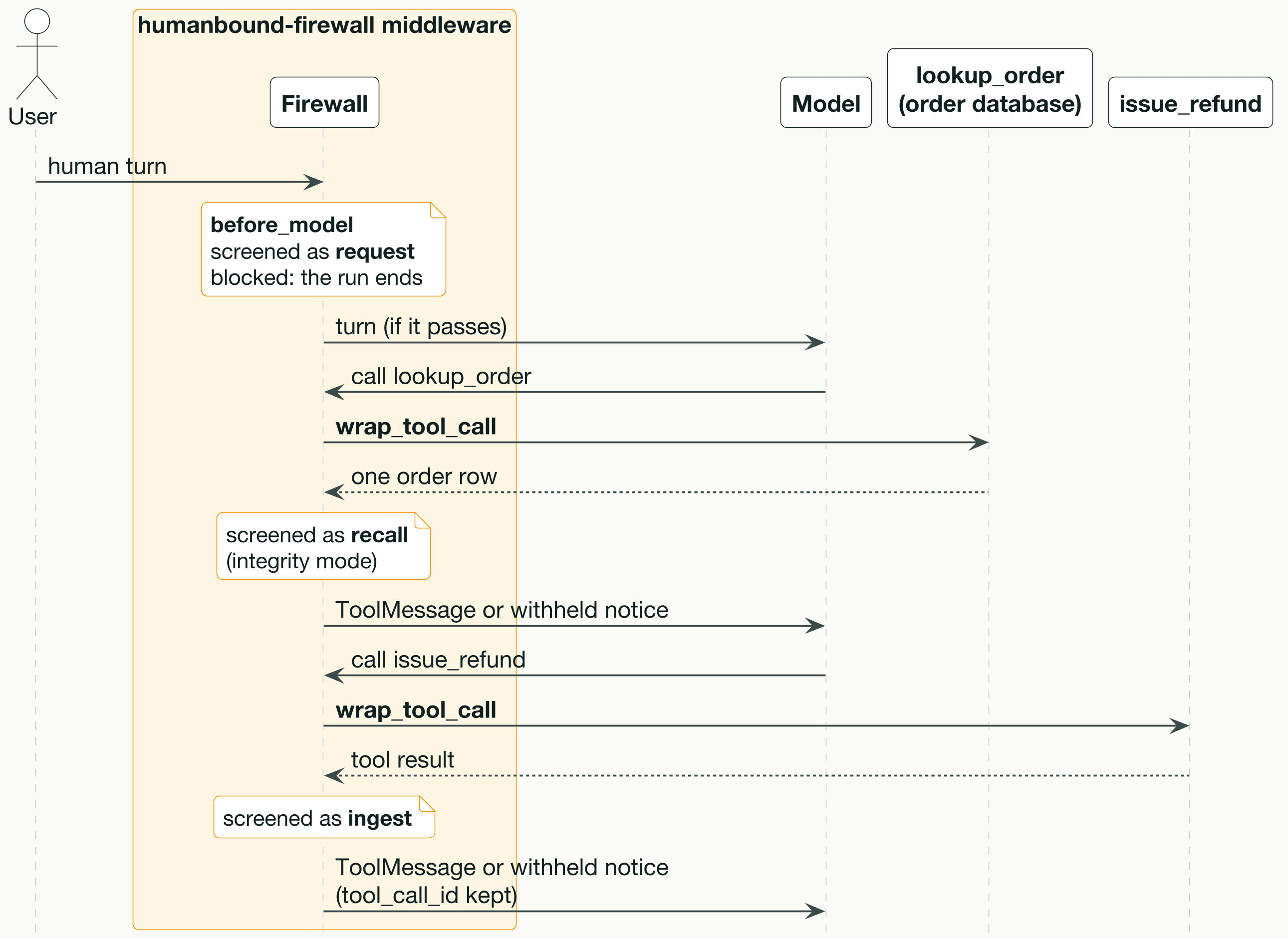
model and tools are whatever your agent already uses. adapt_to("langchain") returns a LangChain AgentMiddleware bound to this firewall. It screens the human turn before the model sees it (request), and it wraps every tool call so that each text result is screened as ingest, or as recall for tools your policy lists there. When a tool result is blocked, the ToolMessage content is replaced by a withheld notice and its tool_call_id is kept, so the agent loop stays valid. When the human turn is blocked, the run ends and the replacement text becomes the agent's reply. Nothing is configured per tool.
Before you trust it, look at what it attached. Keep a handle on the middleware and pass it the tool list:
For the support bot, that prints:
Read it line by line against your threat model. issue_refund has no expects entry, so the judge falls back to the tool's docstring. If the docstring reads like an instruction to the model rather than a description of the output, that is a good reason to add an expects line. mw.boundaries gives the same information as a list of dicts if you want to assert on it in a test.
The tools= argument only feeds the inventory and a sanity check. Without it, the report lists only the human turn and the tools your policy names, though the middleware still screens every tool at run time. With it, a policy entry that names a tool the agent does not have produces a logged warning (agent.yaml tools: entries name tools this agent does not have: ...) and is left out of the inventory. The policy loader itself does not check tool names, so a typo in recall: fails quietly unless you pass tools=.
Roll it out in log mode, then block
The policy file says what your agent is. How the firewall acts on a verdict is a deployment choice, set in code. Start in log mode with an audit callback, so you can see what the firewall would have done without changing anything the agent does:
on_decision fires with every Decision, including passthroughs and engine failures. Through the LangChain adapter, d.boundary is always set (the human turn reports as human turn). If you call inspect() yourself without a boundary=, it is None, which is why the callback guards it. The firewall uploads nothing on its own, so this callback is where verdicts reach your logs or dashboard.
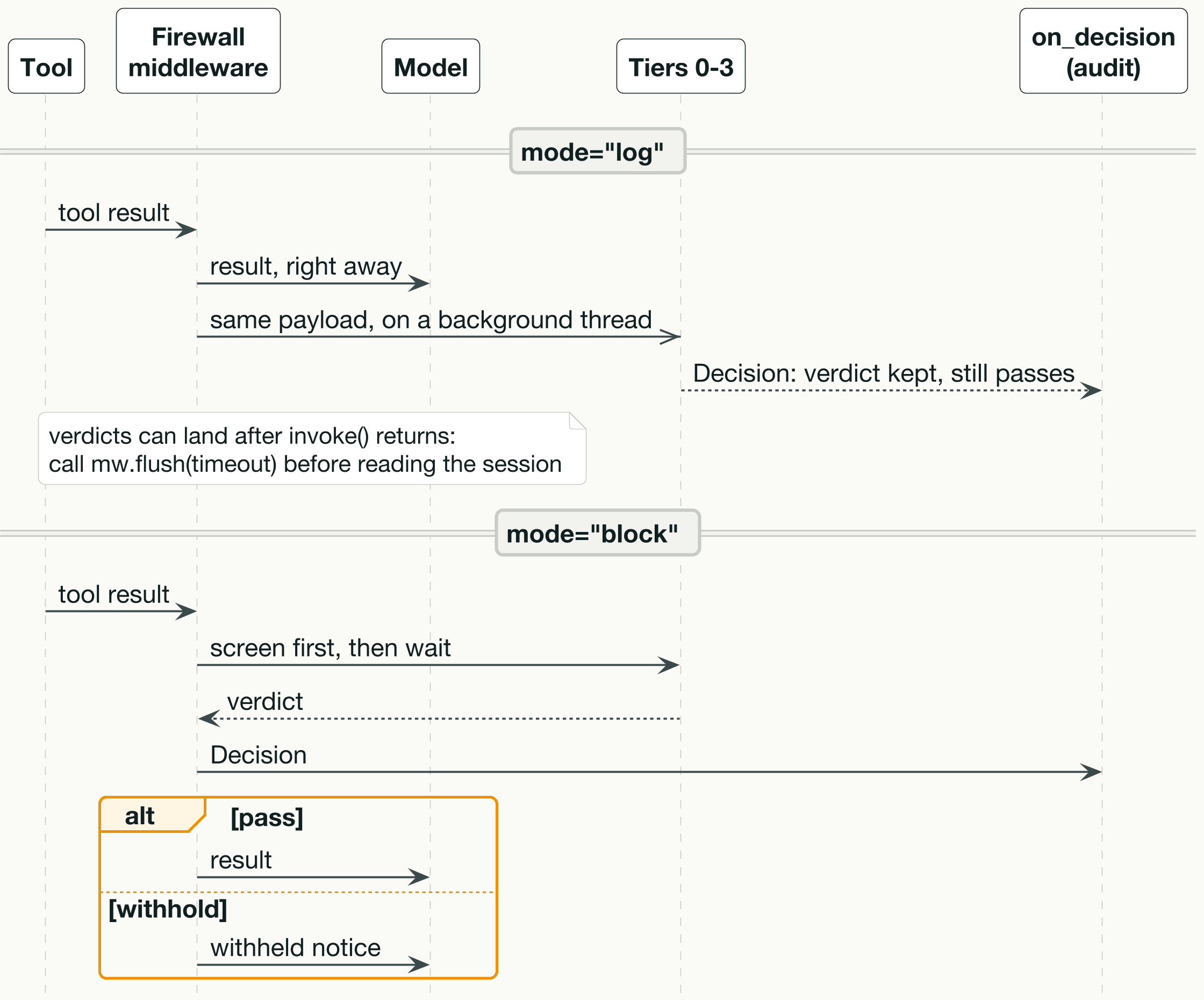
In log mode the adapter does not wait for verdicts. The tool result goes to the model right away and the same payload is judged on a background thread, in call order per LangGraph thread. Verdicts can therefore land after invoke() returns. Call mw.flush(timeout) before a test checks what on_decision received, or before a request handler returns in a process that might exit. It returns False on timeout. flush() does not update a result you already hold: the session in result["humanbound_session"] contains only the verdicts that landed before the run ended, and the rest are folded in at the thread's next run. A test that needs one run's complete session should build the middleware with log_blocking=True:
The session travels under humanbound_session in the agent state. It holds counts, payload hashes, boundaries, the pinned user request and a posture that stays elevated after a block for the rest of the thread. It holds no tool output and no record content. With a checkpointer it persists across runs of a thread. If you want log mode to wait for each verdict as block mode does, pass adapt_to("langchain", log_blocking=True).
Once the audit log looks right, move to enforcement. You do not have to flip everything at once:
classes drops the human turn from screening here, which makes sense if the turn comes from your own trusted UI. In the inventory its mode then reads off. mode_by_class lets one class stay in log mode while the others block. The mode argument in code takes precedence over a settings.mode of block or log in the policy file; with neither set, the firewall blocks. settings.mode: passthrough is the exception: it switches evaluation off for every class even when code says mode="block", and the inventory still prints block, so keep it out of production policy files.
Choose fail deliberately. The default, fail="open", lets an uncertain verdict or an engine failure through. fail="closed" rejects an uncertain request and withholds uncertain tool output or records. Closed is the right default for an agent that moves money, like this one, but it turns every judge timeout, provider outage and missing key into a withheld result. Run closed only once the audit log shows how often Uncertain actually comes up.
Screening agents that are not on LangChain
inspect() is the call the adapter makes, and you can make it yourself anywhere content enters your model's context. LangChain is the only adapter in 0.3.1; ask adapt_to() for any other framework and it raises a ValueError pointing you to inspect(). The pattern from the docs, wrapped in a function so it compiles:
This is a sketch: fetch, store and the transcript are placeholders for your own code. inspect() is stateless, so you carry the session between calls yourself, and the same contract works across processes. Its action is one of pass, withhold or reject, with your modes already applied. evaluate() is the lower-level filter behind it: it returns the verdict, category, tier and explanation and leaves the decision to you. In 0.3.1, on_decision fires for inspect() calls, not for evaluate().
What the firewall does not cover
The middleware screens text tool results and the human turn. It skips a tool that returns a Command, and a message whose content is a list of blocks rather than text. LangChain also exposes no generic hook for several paths that can still carry an injection: memory or store reads inside a node, summarization middleware, documents your application retrieves and stuffs into the prompt itself, Command-style hand-offs between agents, and MCP or tool definitions injected at registration. For each of those, call firewall.inspect() where the content is read and carry the session yourself. If your policy declares memory or inter_agent under capabilities, the inventory lists those boundaries with no hook, which is a useful reminder that they are your job.
Tier 3 costs tokens and time. Each escalation is an LLM call, and in block mode the verdict comes before the model sees the payload, so the judge's latency sits on your agent's critical path, bounded by settings.timeout. The docs position Tier 1 and Tier 2 as the way to resolve more payloads locally and send fewer to the judge. Both are optional, and both carry setup. Tier 1 pulls in torch and transformers. Tier 2 needs adversarial test logs from hb test, a classifier script fetched from the firewall repository, the setfit package (which neither package installs) and an hb firewall train run.
The policy file has limits of its own. It describes scope, intents, capabilities and tool authorship. It can set a default settings.mode, but enforced classes, per-class modes and fail behavior live in code, and a mode argument in code overrides the file's block or log (but not passthrough, which turns evaluation off). The hb guardrails export does not carry few-shot examples yet. The judge has only the wording of your intents to go on, so a vague restricted intent gives it little to enforce. Review the generated list with the same care you would give a firewall rule set.
Where to go from here
The Firewall page covers the full agent.yaml reference, the EvalResult and Decision fields, programmatic provider setup, and Tier 1 and Tier 2 configuration. The LangChain page covers the session reducer for parallel tool calls, streaming with astream_events, and testing an integration against a fake engine with no network. The Guardrails page explains how hb guardrails derives the policy from your test results, and it is the place to start if your agent.yaml should improve as your tests do. For a worked example, PriceWatch is an intentionally vulnerable LangChain pricing agent with the two-line integration and a tools: block already in place.